
What’s newCard-testing protection now guards every store, Free included. See checkout
Extensions › Shipping › OptimalShip
 Included with Premium
DHL Express at checkout, at your rates.
Show international shoppers a DHL Express rate priced live by your Optimal Logistics account, with delivery days. Add your markup, insure shipments for their value and offer free DHL over an amount.

A DHL choice next to your other live rates, priced by your Optimal Logistics account for each cart and destination.
OptimalShip’s transit days show beside the price when your store shows delivery days for live rates.
The cart is packed into the boxes on Settings › Shipping and each box is quoted as its own piece. Sizes and weights convert to the units DHL prices in.
Add a flat or percent markup, set the fuel surcharge, and offer free DHL over a cart subtotal.
Insure shipments for their value, pay duties and taxes for customers with DHL’s duties-paid service, or use neutral delivery for drop-shipping.
Each quote waits at most 10 seconds. If OptimalShip is slow or down, DHL is left out for a few minutes and every other rate shows as usual.
With a Premium license, OptimalShip installs in one click and updates like any other plugin.
In Settings › Shipping, choose Live shipping rates as the store’s rate method. DHL then shows beside your other live rates.
Paste the export/import number from Optimal Logistics, pick the country you ship from and press Check connection.
Choose the countries, your markup, insurance and an optional free DHL amount.
Quote any destination with your saved settings and see the full breakdown before shoppers do.
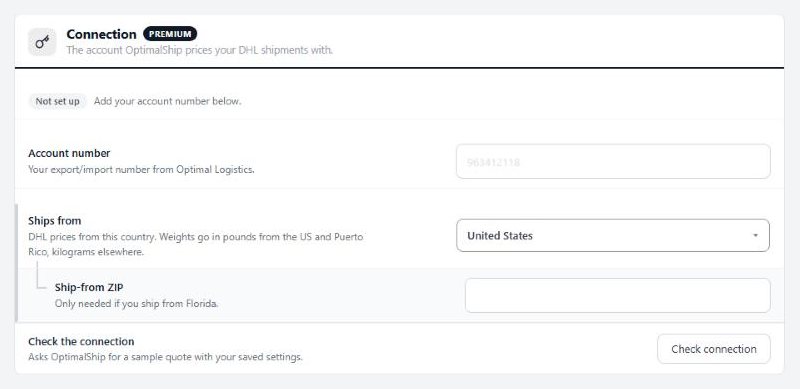
Connecting is one account number and the country you ship from.
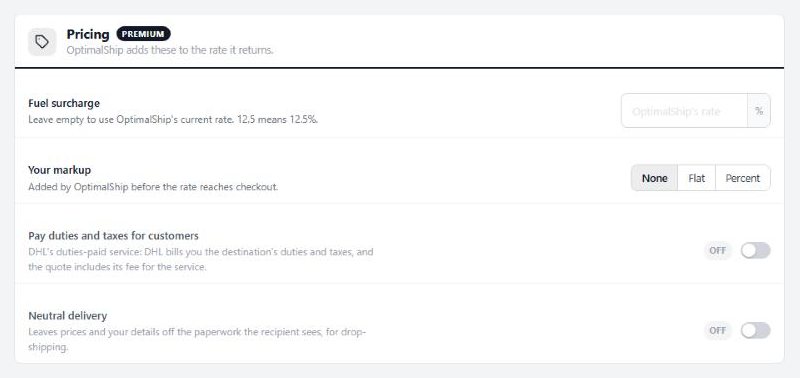
Your markup, fuel surcharge, duties-paid and neutral delivery are priced into every quote.
Install OptimalShip from EasyCart › Extensions with Premium, add your Optimal Logistics export/import number, and choose Live shipping rates in Settings › Shipping. DHL then shows at checkout next to your other live rates, with delivery days.
Yes. DHL is a live rate, so it needs WP EasyCart PRO. DHL rates then show alongside your other live rates.
An account with Optimal Logistics, the DHL Express reseller behind OptimalShip. You enter the export/import number they give you, and every quote is priced on your account.
No. OptimalShip gives rates at checkout only. Book and label shipments with Optimal Logistics.
No. It quotes shipments that leave your ship-from country, so DHL is never offered at home. Set up another live carrier for domestic orders. You can offer DHL to every international country, only some, or all except some.
Yes. Add a flat or percent markup on the total or the base rate, set the fuel surcharge, and offer free DHL when the cart subtotal reaches an amount you choose.
Each quote waits at most 10 seconds. If OptimalShip does not answer, DHL is left out for 5 minutes and every other rate shows as usual.
Connects your store to ShipStation: paid orders go in, shipments and tracking come back. Labels, rates at checkout and stock too.
Buys and prints labels for USPS, UPS, FedEx, DHL and more from the order screen, brings tracking and delivery back, and shows Shippo rates at checkout.
Buys USPS, UPS, FedEx and DHL Express labels with your Stamps.com account from the order screen, and brings tracking back to every order.
Along with every PRO feature and the other Premium extensions, installed and updated from one screen.
★★★★★ 4.5 from 226 public reviews865,000+ downloads25+ years building ecommerce