
What’s newCard-testing protection now guards every store, Free included. See checkout
Extensions › Sales channel › Facebook & Instagram
 Included with Premium
Your products on Facebook and Instagram, always current.
Your products, variants, prices and stock go to your Meta catalog and stay in step with your store, ready for your Facebook and Instagram Shop and catalog ads. Start with the hourly product feed, no sign-in needed, or connect your Meta business and changes arrive within a minute.

Connected, a changed product, price or stock count reaches your Meta catalog within a minute, with a full check every night. On the feed, Meta fetches it every hour.
Each size or color with its own stock goes as its own item with its own price, stock and image, grouped under the product. Up to 20 images per item.
A Facebook & Instagram card in the product editor lets you hide a product, give it its own title, description and images, and see what Meta shows.
Facebook and Instagram Shops send shoppers to your checkout with their items in the cart and the Shop’s coupon applied. The order notes which Shop it came from.
Each category becomes a product set for Shop collections and ads, and custom labels like On sale or top category help you build ad sets. Product sets need a connection.
Needs attention lists what Meta rejected or warned about, plus missing images, brands and prices, each with a button that opens the fix.
With a Premium license, Facebook & Instagram installs in one click and updates like any other plugin.
Leave out categories or product types, and set the brand, condition, description and custom labels every product gets.
Open Catalog › Data sources, choose Data feed › Scheduled feed, paste your feed URL and pick Hourly. No sign-in needed.
Paste a system user token from your own Meta app and pick your business, catalog, Pixel and Page. Changes then reach Meta within a minute.
Copy the Checkout URL into Commerce Manager › Settings › Checkout and run Meta’s checkout URL test.
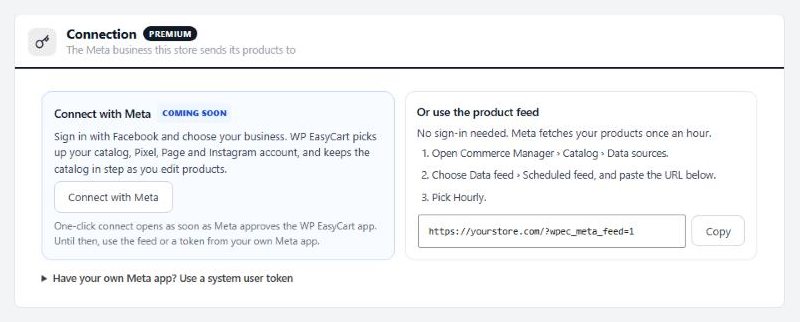
Start with the hourly feed in three steps, or connect with a token from your own Meta app.
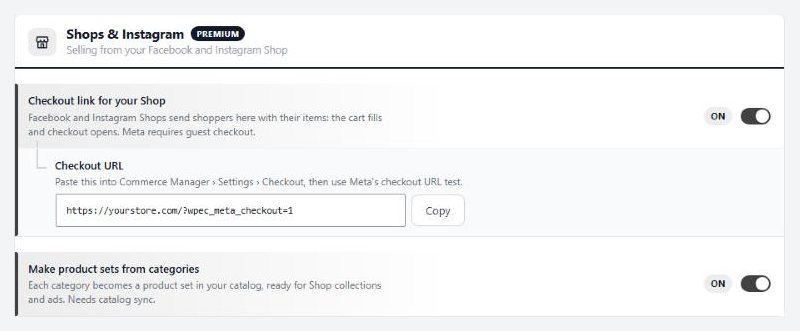
One checkout URL for Commerce Manager, and a product set for each category.
Install Facebook & Instagram with Premium, then add its feed URL in Commerce Manager under Catalog › Data sources as an hourly scheduled feed. No sign-in is needed. If you connect a system user token from your own Meta app instead, products are sent straight to your catalog, and the extension can create the catalog for you.
Yes. Connected, a changed product reaches Meta within a minute and a full check runs every night. On the feed, the file is rebuilt within five minutes of a change and Meta fetches it every hour. Orders that change stock count too.
Only to sync as you edit. That needs a system user token from your own Meta app with catalog_management, business_management, ads_management and pages_read_engagement. The product feed needs no app and no sign-in.
Yes. Your Shop sends shoppers to your store with the items they picked: the cart fills, a valid Shop coupon is applied and checkout opens. Meta requires guest checkout, so switch it on in Settings › Accounts. Subscriptions, gift cards and products that need options chosen can't be added this way and are skipped with a note.
No. They come with WP EasyCart PRO, under Settings › Integrations › Meta Pixel. When you connect, the extension fills in the Pixel you picked and the token for server events. Catalog items use the same product IDs the Pixel sends, so Meta can match views and purchases to products.
To start, gift cards, donations, subscriptions, catalog-only and inquiry products, products priced only for signed-in or chosen customers, products with no price and products with no image. Switch any of these back on, leave out whole categories, or hide one product from its card.
Syncing and the feed keep running with the settings you have. The settings page and product cards turn read-only until you renew.
Keeps products, customers, orders, abandoned carts and coupon codes in step, and newsletter sign-ups both ways.
Sets AffiliateWP referral rates for individual products.
Along with every PRO feature and the other Premium extensions, installed and updated from one screen.
★★★★★ 4.5 from 226 public reviews865,000+ downloads25+ years building ecommerce