
What’s newCard-testing protection now guards every store, Free included. See checkout
Extensions › Tax › Avalara AvaTax
 Included with Premium
Avalara works out the tax. Every order lands in Avalara.
Avalara calculates the sales tax for the exact cart, address and customer at checkout. Each order is then recorded in Avalara under its order number and follows its payments, edits, cancellations and refunds, so the sales Avalara reports and files include your store’s.
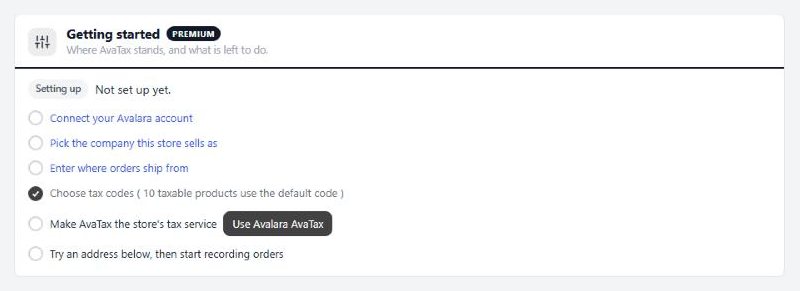
Avalara taxes the exact cart, address and customer on the classic and one-page checkout, and on a subscription’s first payment.
Orders are recorded in Avalara, committed when paid or shipped, voided when cancelled, refunded with the order and updated when you edit it.
If Avalara doesn’t answer within eight seconds, backup rates step in. Those orders are recorded in Avalara with the tax charged once it answers.
Search Avalara’s codes from the product editor, and give whole groups of products a suggested code in one click.
Set an exemption reason and number per customer, or use Avalara exemption certificates, with requests sent by email or link.
US and Canadian shoppers can accept Avalara’s corrected version of their address. Nothing changes without their click.
With a Premium license, AvaTax installs in one click and updates like any other plugin.
Paste your Account ID and license key from Avalara › Settings › License and API keys, then test the connection.
Choose the Avalara company you sell as and where orders ship from. A checklist ticks off each step.
Ask Avalara for the tax on any address in test mode. Nothing is recorded.
When the answers look right, turn on recording and orders go to Avalara from that moment.
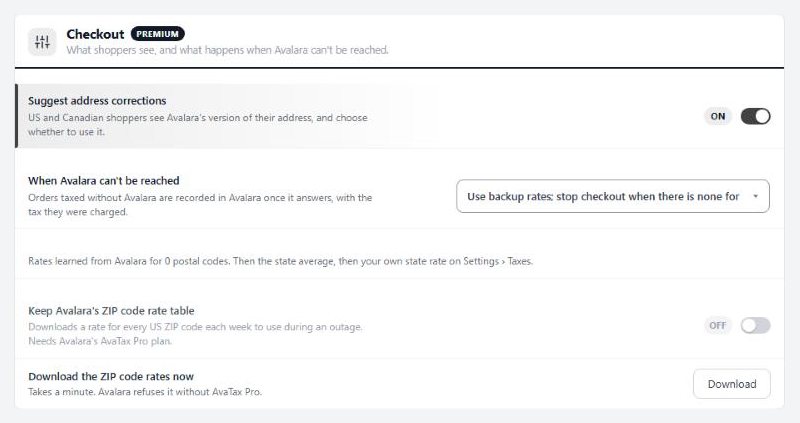
Choose what checkout does if Avalara can’t be reached.
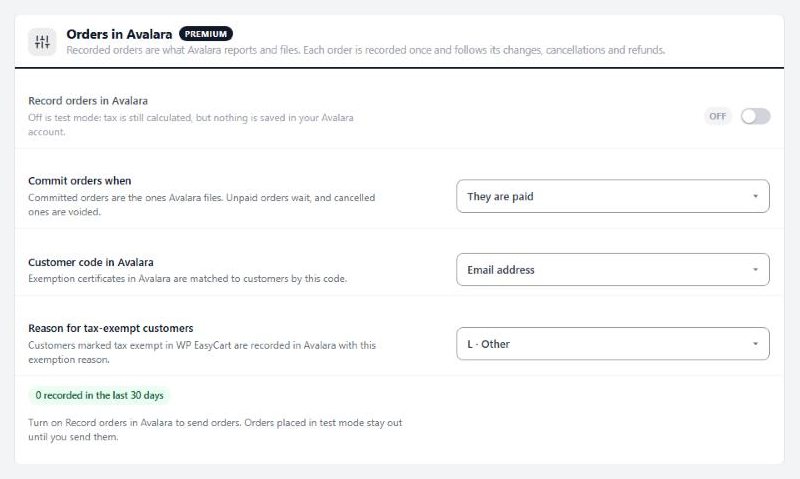
Record orders and choose when they are committed for filing.
Install AvaTax from EasyCart › Extensions with a Premium license, then paste your Avalara Account ID and license key. A checklist walks you through picking your company, your ship-from address and your tax codes, then turning AvaTax on as the store's tax service.
Yes. With recording on, each order is recorded in Avalara under its order number. It is committed when it is paid (or shipped, if you choose), voided when it is cancelled or deleted, refunded with the order, and recorded again when you edit it.
If Avalara doesn't answer within eight seconds, checkout uses backup rates learned from Avalara, Avalara's ZIP code rate table (on Avalara's AvaTax PRO plan) or your own rates. You choose whether checkout stops or takes the order without tax when there is no backup rate. Those orders are recorded in Avalara with the tax charged once it answers.
Yes. Recording starts off, so tax is calculated at checkout but nothing is saved in your Avalara account. Try an address shows Avalara's tax and every jurisdiction for any address. Turn on recording when you're ready.
Yes. Set an exemption reason and number on each customer's screen, or use Avalara's exemption certificates: certificates show on the customer's screen, a valid certificate exempts their orders, and you can ask a customer for a new certificate by email or with a link.
Yes. Choose the United States only, the United States and Canada (GST, HST and PST from Avalara), or every country (VAT from Avalara too). Other addresses keep using the rates on Settings › Taxes.
Yes. The Send orders tool records paid orders Avalara does not have yet, with the tax each was charged, including orders from test mode or an outage. Only send orders you haven't already reported to Avalara another way.
Syncs orders, customers and products with QuickBooks Desktop through the QuickBooks Web Connector.
Connects your store to ShipStation: paid orders go in, shipments and tracking come back. Labels, rates at checkout and stock too.
Along with every PRO feature and the other Premium extensions, installed and updated from one screen.
★★★★★ 4.5 from 226 public reviews865,000+ downloads25+ years building ecommerce