
What’s newCard-testing protection now guards every store, Free included. See checkout
Extensions › Accounting › QuickBooks Desktop
 Included with Premium
Paid orders land in your books. No retyping.
Paid orders, customers, products and refunds go to QuickBooks Desktop every time the QuickBooks Web Connector runs. Each order arrives as a sales receipt or an invoice with its payment, with lines that add up to the order total.
Paid orders go as sales receipts with how the customer paid, or as invoices with the payment received against them.
Accounts and guests become QuickBooks customers. Products become inventory or non-inventory items, or link to the item QuickBooks already has.
Each refund becomes a credit memo and a refund with the order’s payment method, and is never credited twice.
Shipping, Flex-Fees, tips, discounts, sales tax, duty and VAT go on the QuickBooks items you choose, so every order adds up.
Map cards, PayPal, pay later, bank payments, Amazon Pay and bank transfer to your QuickBooks payment methods.
The Sync page shows what is waiting, sent or refused, with QuickBooks’ own message and a Send again button.
With a Premium license, QuickBooks Desktop installs in one click and updates like any other plugin.
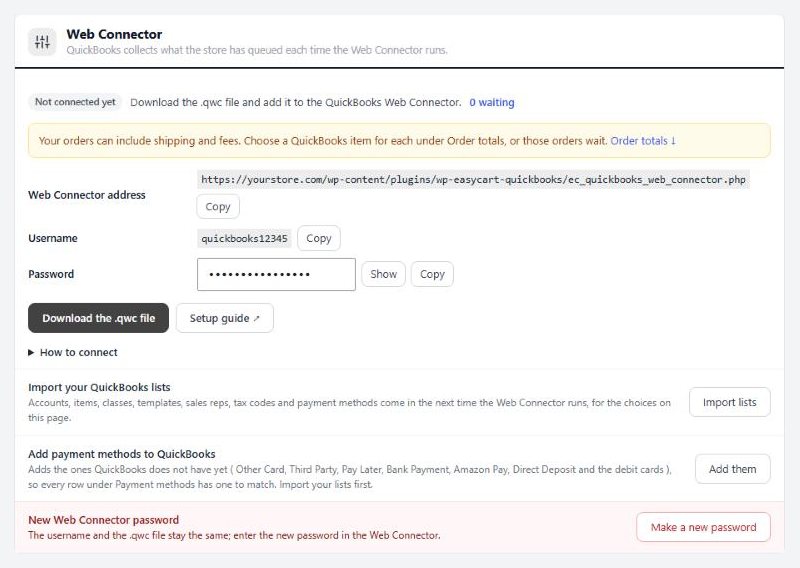
On the QuickBooks computer, open your company file, download the .qwc file and open it in the Web Connector.
Copy the password from EasyCart › Extensions › QuickBooks Desktop into the Web Connector.
Import your accounts, items and payment methods, then choose which ones your orders use.
The Web Connector then runs every 10 minutes while QuickBooks is open.

Pick the QuickBooks item for each part of an order.

Match every way customers pay to a QuickBooks payment method.
Install the extension from EasyCart › Extensions with a Premium license, then add its .qwc file to the QuickBooks Web Connector on the computer that runs QuickBooks and type in the password. Import your QuickBooks lists and choose the accounts, items and payment methods your orders use.
No. This extension is for QuickBooks Desktop (PRO, Premier or Enterprise) through Intuit's QuickBooks Web Connector.
Every time the Web Connector runs. The .qwc file asks for a run every 10 minutes with Auto-Run on. Changes wait in the queue while the QuickBooks computer is off or the company file is closed, then all go on the next run.
Your choice. Sales receipts record each paid order with its payment method. Invoices add an invoice, then a received payment against it. Pick one before your first orders go.
Yes. Each refund goes as a credit memo and a refund with the order's payment method, capped at what the order has left to credit.
Yes. The Store records page lists your orders, customers and products with their QuickBooks status. Send older ones, or link them to records QuickBooks already has so nothing is added twice.
The extension itself needs WP EasyCart and a Premium license, and your site must be on HTTPS for the Web Connector.
Calculates sales tax at checkout and records every order in Avalara, so your returns include your store’s sales.
Connects your store to ShipStation: paid orders go in, shipments and tracking come back. Labels, rates at checkout and stock too.
Along with every PRO feature and the other Premium extensions, installed and updated from one screen.
★★★★★ 4.5 from 226 public reviews865,000+ downloads25+ years building ecommerce