
What’s newCard-testing protection now guards every store, Free included. See checkout
Extensions › Shipping › ShipStation
 Included with Premium
Paid orders go in. Tracking comes back.
Connect your store to ShipStation as a Custom Store: paid orders import on their own, shipments and tracking come back to each order, and your customer gets the shipped email. Add an API key to buy labels from the order screen and show ShipStation rates at checkout.
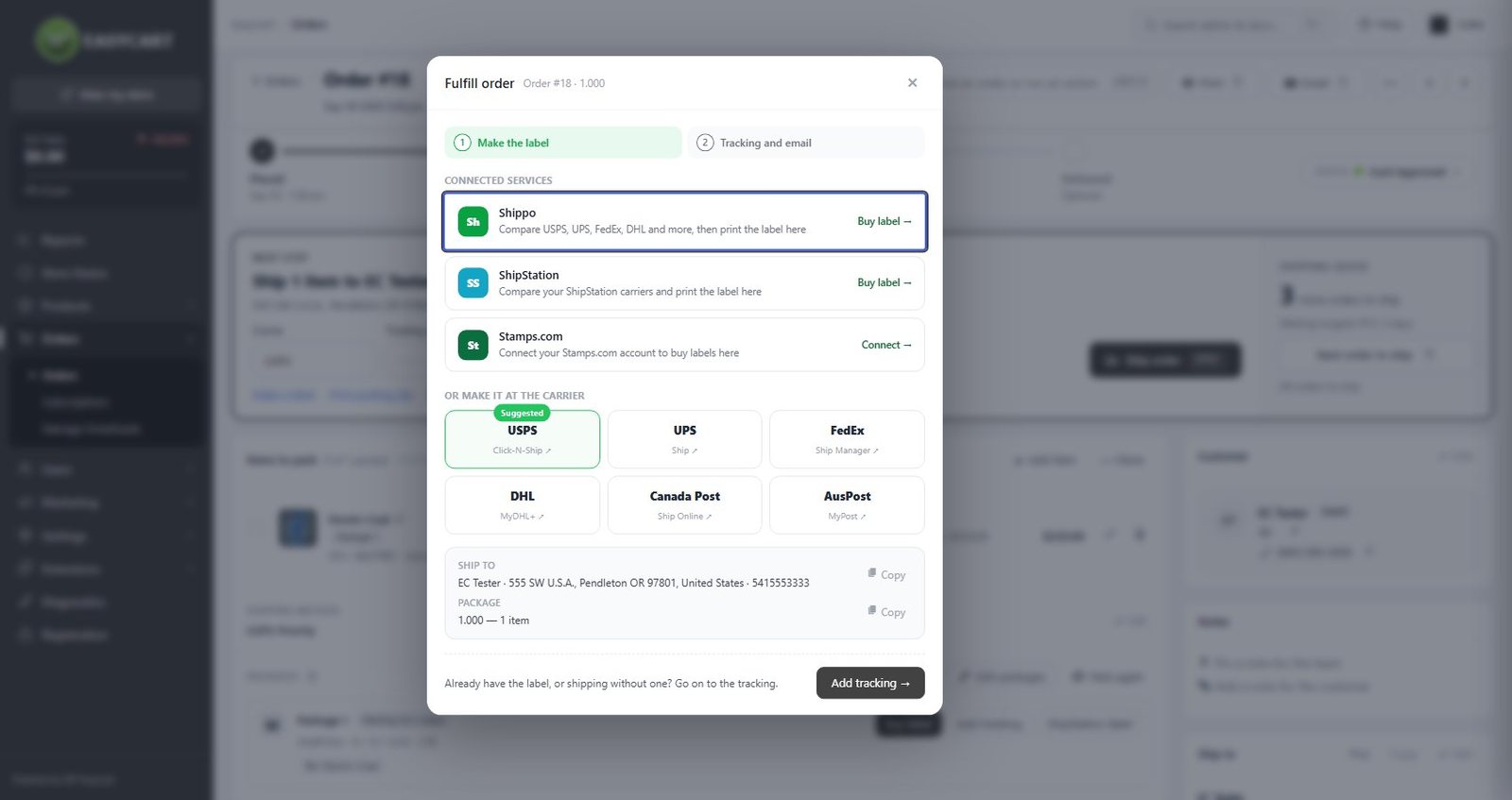
ShipStation pulls paid orders as a Custom Store. Add an API v1 key and each order imports straight away.
Each shipment returns with its items, carrier and tracking number. Partial shipments work, and the order moves to Shipped when everything has gone.
WP EasyCart sends the shipped email with the tracking link, or let ShipStation send its own. Never both.
With an API v2 key, compare carriers, buy and print labels, void them, and make return labels and customs forms.
Show ShipStation rates to shoppers, with an optional markup and handling fee. Needs WP EasyCart PRO.
Edits, cancellations, refunds and deletions follow to ShipStation, and delivery updates can mark an order Delivered.
With a Premium license, ShipStation installs in one click and updates like any other plugin.
In ShipStation, open Settings › Selling Channels › Store Setup and choose Custom Store.
Copy the URL, username and password from EasyCart › Extensions › ShipStation, and type the five status words.
Click Test Connection, then Connect. Paid orders start importing on their own.
An API v2 key adds labels, checkout rates, stock and delivery updates. An API v1 key imports each order straight away.
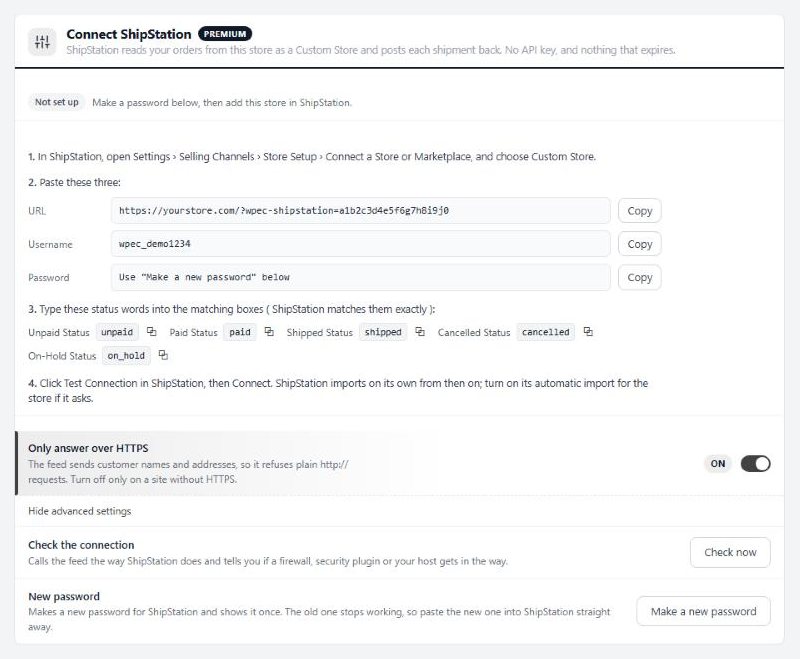
Connecting is three values to paste into ShipStation. No API key needed.
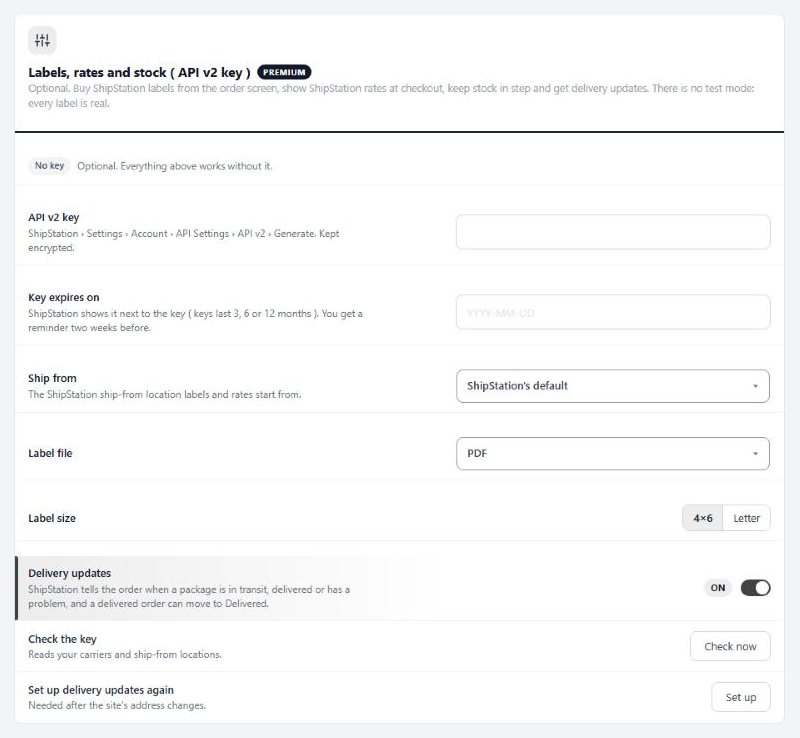
An optional API v2 key turns on labels, checkout rates, stock and delivery updates.
ShipStation reads your paid orders as a Custom Store, using a URL, username and password that WP EasyCart makes for you. No API key is needed for this. ShipStation imports on its own schedule, or straight away if you add an API v1 key.
Yes. Add an API v2 key and you can compare carriers, buy and print labels, void them, and make return labels and customs forms from the order screen. There is no test mode, so every label is real and charged.
Yes, with an API v2 key and WP EasyCart PRO, with an optional markup and handling fee. If ShipStation takes more than 8 seconds to answer, its rates are skipped and your other rates still show.
One way. With an API v2 key and ShipStation Inventory, WP EasyCart reads stock levels by SKU from ShipStation every hour.
WP EasyCart sends its shipped email with the tracking link by default. You can let ShipStation send its own instead; customers never get both.
ShipStation Standard or higher.
Yes. Each shipment is saved on the order, and the order moves to Shipped once everything has shipped.
Buys and prints labels for USPS, UPS, FedEx, DHL and more from the order screen, brings tracking and delivery back, and shows Shippo rates at checkout.
Buys USPS, UPS, FedEx and DHL Express labels with your Stamps.com account from the order screen, and brings tracking back to every order.
Shows DHL Express rates from your Optimal Logistics account at checkout, with your markup, insurance and delivery days.
ShipStation comes with every Premium license, along with every PRO feature and the other Premium extensions.
★★★★★ 4.5 from 226 public reviews865,000+ downloads25+ years building ecommerce