
What’s newFind any order, customer, product or setting with one admin search. See all features
Features › Subscriptions and memberships
Sell subscriptions billed through Stripe, with trials, sign-up fees, plans customers can switch between and prices by how much they use, and keep pages for members only. Right inside your WordPress store.


Chasing renewals, cancelling by email and hiding pages by hand doesn’t scale past your first few members.
Turn any product into a subscription. Choose how often to bill, how many payments to take or bill until cancelled, add free trial days and a sign-up fee, and charge shipping once or on every payment. Turn on the short subscription checkout for plans that ship nothing: name, country and postcode with the payment on one screen. Stripe handles the billing.

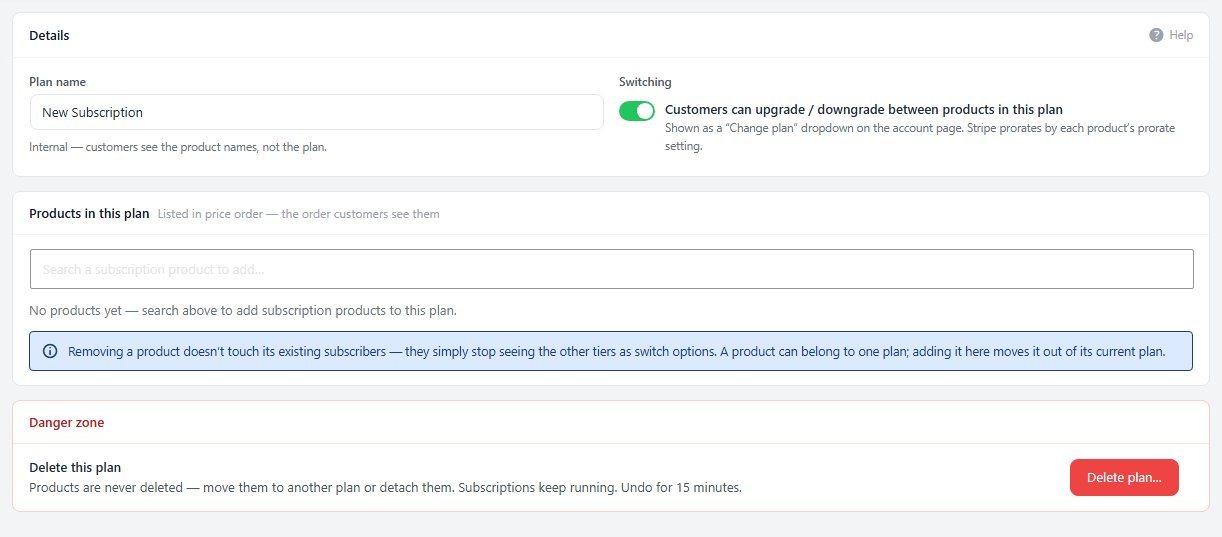
Group subscription products into a plan, such as Basic, Plus and PRO. Customers see a Change plan menu in My Account, and Stripe prorates the difference when you turn prorating on. Customers can also update their card and cancel there, so you don’t have to.
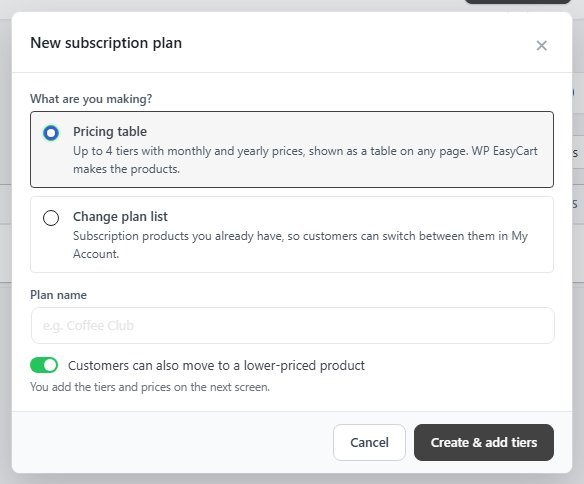
Build a pricing table where customers pick how much they need, such as 10 seats or 25,000 subscribers, and move up or down later in My Account. Give each card its own badge and button, link a tier to another page such as Contact us, and show it anywhere with the Pricing table block, the shortcode or Elementor.
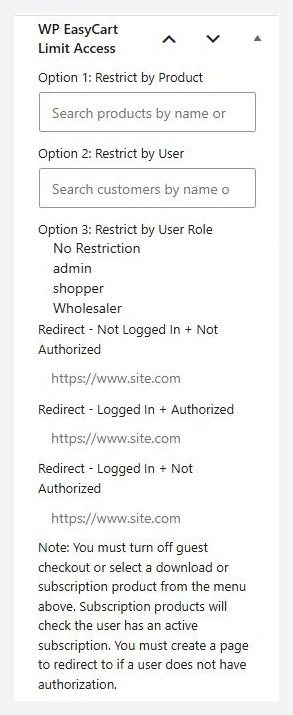
Every edition can limit a page or post to customers who bought a chosen product, to chosen customers, or to a user role. Turn each rule on or off, see every limited page on one screen, preview a page as a visitor would see it, and show signed-in customers without access a button to buy it. Members-only content stays out of search, feeds and the REST API.
Start with the free WordPress shopping cart plugin and add what your store needs.
Each one installs in a click from EasyCart › Extensions.
Keeps a matching WordPress user for every WP EasyCart customer account.
Keeps products, customers, orders, abandoned carts and coupon codes in step, and newsletter sign-ups both ways.
Yes, with PRO. Any product can be a subscription billed through Stripe, with a billing interval, trial days, a sign-up fee and an optional number of payments.
Stripe. Subscriptions are billed through Stripe, so you need a connected Stripe account and PRO. Your other gateways keep taking regular orders in the same store.
Yes, with PRO. Put the products in a subscription plan and customers get a Change plan menu in My Account. Stripe can prorate the change.
Yes, with PRO. A usage-based pricing table gives each level its own price, such as 10 seats or 25,000 subscribers, and customers can move up or down later in My Account. See how to sell plans from a pricing table.
Yes. In My Account, subscribers can update their card, change plan and cancel. You can pause and resume a subscription from the admin.
Use the Limit Access box on any page or post to allow only buyers of a product, chosen customers or a user role, and choose where everyone else goes. Users › Limit Access lists every limited page, and you can preview any of them as a visitor. It's in every edition, including Free.
Yes, with PRO. Set trial days on the subscription product. Customers get an email before the trial ends.
Install the free plugin for members-only pages, or try PRO free to sell subscriptions through Stripe.
★★★★★ 4.5 from 226 public reviews865,000+ downloads25+ years building ecommerce